
 |
| Quantity: | |
|---|---|
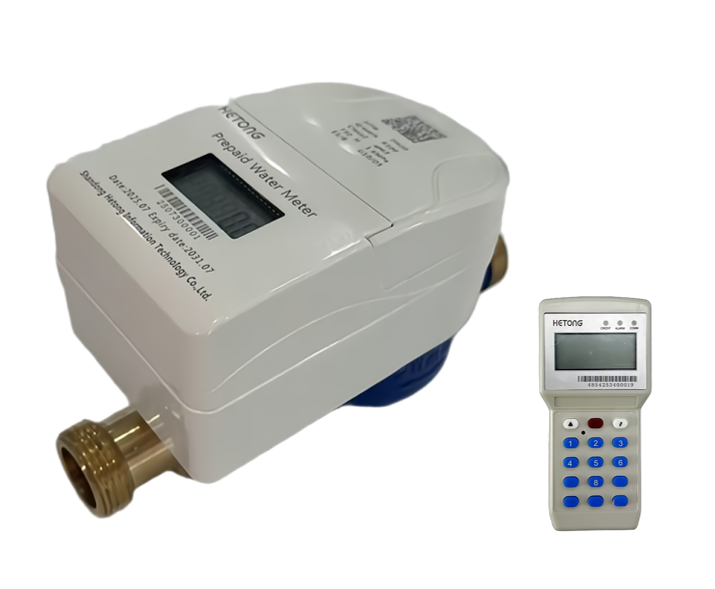
This split-type STS prepaid water meter is suitable for residential, commercial, and institutional water metering and billing, effectively solving the problem of difficult in-person fee collection.
Function and Characterristic
• 20-Digit TOKEN code transmission, implements a prepaid control mode where payment is required before water usage;
• LCD display, show various meter data and operational status.;
• Real-Time Fault Monitoring, detects malfunctions, reports errors, and logs events;
• Wireless Communication, enables TOKEN code transmission and parameter configuration;
• Auto Shutoff & Alarms – Valve closes and triggers alerts for low battery, insufficient prepaid balance, magnetic tampering, or leakage;
• Valve Control Function – Allows remote or automatic valve operation;
• Low Balance Warning & Override – Valve shuts off when remaining water reaches the warning threshold, prompting user recharge. The valve can be temporarily reopened once via CIU communication;
• CIU Management – Supports balance queries, top-ups, and parameter adjustments via the Customer Interface Unit.
Water meter main technical parameters
ITEM | parameters | |
standard | ISO 4064:2014 IEC_62055-41:2018 | |
Type | Dry-type cold water meters | |
Installation method | Horizontal | |
Nominal Diameter(mm) | 15 | 20 |
L(mm) | 165 | 195 |
Q3(m3/h) | 2.5 | 4.0 |
Q3/Q1 | 100/80 | |
Accuracy class | Class 2 | |
Sampling Principle | pulse acquisition | |
Display | Character wheel+Pointer | |
Meter reading range | mechanical:0-99999.99999,Electronic:0-99999.9 | |
Flow profile sensitivity | U10/D5 | |
Pressure class | MAP16 | |
Temperature Class | T30 | |
Pressure loss | Δp63 | |
Electormagnetic class | E1,B | |
Working environment | Temperature:-25℃~70℃;Humidity≤100% | |
Protection class | IP68 | |
Housing material | Cu | |

CIU main technical parameters
Working temperature range | -10℃~55℃ |
Limit of working temperature | -35℃~65℃ |
Transport and storage temperature | -40℃~70℃ |
Working Humidity | 30%~95% |
Total Power consumption | <4VA,2W |
ESD Protection | Air discharge;15KV;contact discharge:8kv(IEC 61000-4-2 compliant) |
MTBF | ≥6×10⁴h |
Life | ≥10years |
Display | LCD |
Power | DC 3.0V(2xAA batteries) |
Data Communication | Complies with CJ/T 188 standard for data transmission of user metering devices |
LCD Display Functionality
Both the water meter and CIU (Customer Interface Unit) are equipped with LCDs capable of displaying data items. The CIU requests meter data via button-activated query commands and synchronizes the display accordingly.
LCD Display
The liquid crystal display (LCD) visually presents water consumption data and meter status information through a combination of English text, intuitive symbols, and numerical values. When fully activated, the LCD displays the complete interface as shown in the following diagram:

Water meter LCD display
Meter LCD display code segment diagram
symbol | LCD display | Remark |
| Digital Display | |
| Water Unit Symbol | |
| Currency Symbol | |
| Display Codes | |
| bATT | When the meter is in operation, if the detected battery voltage is higher than the prompt under voltage threshold, this prompt symbol will not be displayed, indicating that the battery voltage is normal and the meter is operating normally. During the operation of the meter, if the detected battery voltage is higher than the severe undervoltage threshold but less than or equal to the prompt undervoltage threshold, the meter will operate normally and display this prompt symbol continuously, indicating that the battery voltage is low and needs to be replaced. |
| Prompt symbol for alarm and valve closing due to severe undervoltage of battery voltage | • When the meter is in operation, if the detected battery voltage is higher than the severe undervoltage threshold, this prompt symbol will not be displayed. • During the operation of the meter, if the detected battery voltage is less than or equal to the severe undervoltage threshold, the valve will be closed, and this prompt symbol will be displayed continuously, indicating that the battery voltage is severely insufficient and needs to be replaced. |
| Prompt symbol for insufficient remaining usage alarm | • When the remaining quantity of the water meter is greater than the alarm threshold, this prompt symbol will not be displayed. • When the detected remaining quantity of the water meter is less than or equal to the alarm threshold, the prompt symbol will be displayed continuously to remind the user to purchase water as soon as possible. |
| Prompt symbol for alarm and valve closing due to insufficient remaining usage | • When the remaining quantity in the water meter is ≤ 0: if the preset allowable credit quantity in the meter is 0 (i.e., no credit is allowed), the valve will close to prohibit water usage, and the prompt symbol will be displayed continuously on the LCD to force the user to make a purchase. • When the remaining quantity in the water meter is ≤ 0: if the preset allowable credit quantity in the meter is greater than 0 (i.e., credit is allowed), the valve will open to permit water usage. The valve will close only when the preset allowable credit quantity is exhausted, and the prompt symbol will be displayed continuously on the LCD to force the user to make a purchase. • The prompt symbol will not be displayed under other circumstances. |
| Total Consumption | TOTAL:01213.46m³ |
| Total purchased volume | PURCH:0056.789m³ |
| Valve Open | • Steady ON:Fully open |
| Valve Closed | • Steady ON:Normally closed • Blinking:Abnormal state |
| Valve Leakage | • OFF:NO leakage • Steady ON:Leak detected; |
| Valve Fault | • OFF:Normal ; • Steady Malfunction:VALV-ERR |
| Valve failure | • OFF: Normal; • Steady Malfunction:valve-ERR; |
| Magnetic Tamper | • OFF: No interference Steady ON: Magnetic tampering |
| Operational Status | • Steady ON:factory test mode • OFF:Normal operation |
| TOKEN Key | • Steady ON: KT=0 • OFF:KT≠0 |
| Digital Display | |
CIU Display
In the mains-powered state, when a key operation is performed, the CIU LCD backlight will turn on and the buzzer will sound. If there is no key operation for 5 seconds afterwards, the LCD backlight will turn off. In the battery-powered state, to reduce power consumption, the LCD backlight will not turn on and the buzzer will not sound.

CIU LCD display
1. Valve leakage alarm.
2. Valve status and fault indication.
3. TOKEN setting success indication
4.TOKEN setting failure indication
5. Communication status indication.
6. Water meter battery level indication.
7.CIU battery level indication.
Instructions for using TOKEN
• Recharge TOKEN
Add the remaining purchased quantity in the water meter to the purchased quantity in the TOKEN code. When the remaining purchased quantity in the water meter is lower than the alarm quantity, the user should go to the water sales department to purchase water in a timely manner to avoid valve closure. If the sum of the remaining quantity in the water meter and the purchased quantity in the TOKEN code exceeds the hoarding threshold, the water meter will not add the purchased quantity to itself to prevent exceeding the hoarding limit. However, the TOKEN remains valid. Only when the sum of the remaining purchased quantity and the quantity purchased via the TOKEN is less than the hoarding threshold, and the TOKEN is re-entered, can the purchased quantity in the TOKEN be added to the water meter.
• Test TOKEN
The LCD displays all information,including total water consumption,KRN,and TI.Thevalve opens and closes.
• Clear Credit Limit TOKEN
Clears the remaining quantity,current purchased quantity,total purchased quantity,and credit quantity。
• Clear Status TOKEN
Clears the water meter's statuses such as valve fault, disassembly, cover opening, leakage, and sensor fault.
• Set Allowed Hoarding Quantity TOKEN
Sets the operating hoarding quantity threshold.
• Set Remaining Alarm Quantity TOKEN
Sets the remaining alarm quantity threshold. When the remaining purchased quantity of the water meter is less than the remaining alarm quantity threshold, the valve will close to remind the user to recharge. In this case, the user can communicate with the water meter via CIU to open the valve once.
• Set Allowed Credit Quantity TOKEN
Sets the allowed credit quantity threshold. The water meter allows the user to use water on credit. When the credit quantity is not less than the allowed credit quantity threshold, the valve will close, and the user can only open the valve by recharging.
Installation instructions
Installation size

Nominal Diameter(DN)mm | L mm | W mm | H mm | D |
15 | 165 | 98 | 110 | G3/4B |
20 | 195 | 98 | 110 | G1B |
Installation Precautions
1. The caliber of the water meter should be selected based on water consumption, preferably close to the common flow rate. Rated operating conditions:
a) Flow range: Q1~Q4;
b) Ambient temperature: 5℃~55℃;
c) Temperature of the metered medium: 0.1℃~30℃ for cold water meters, 30℃~90℃ for hot water meters.
2. The installation location of the water meter should avoid exposure to sunlight, freezing, pollution, and flooding, and be convenient for disassembly and assembly. During freezing periods, in addition to wrapping the water meter and water pipes, close the valve at the water inlet end of the meter when not in use, and open the drain valve and faucet at the water outlet end to prevent the meter from being damaged due to freezing expansion. The installation of the water meter must follow the instructions on the meter's dial: meters marked "H" should be installed horizontally, and those marked "V" vertically. The arrow on the meter case must align with the direction of water flow in the pipeline. A control valve should be installed upstream of the meter to facilitate maintenance.
3. For newly installed pipelines, ensure that sand, sediment, hemp, and other debris in the pipeline are thoroughly flushed out before installing the meter to avoid meter malfunctions. When installing the meter, pay attention to its connection length. If the distance between the two end pipelines exceeds the meter's connection length, adjust the pipeline spacing to match the meter's connection length; otherwise, forced installation with excessive spacing may cause the threaded ends of the meter, pipe joints, or connecting nuts to break. If the pipelines at both ends of the meter are not on the same axis, adjust them to be coaxial through other means to meet the meter's installation dimensions.
4. For accurate metering, the water tap should be higher than the water meter.
5. To ensure metering accuracy, generally, a straight pipe section of at least 10D (where D is the pipe caliber) should be reserved before the meter, and a straight pipe section of at least 5D after the meter. Meanwhile, avoid interference from elbows, tees, tapered pipes, and pumps as much as possible. If there is a reducing pipe before the meter, the straight pipe section before the meter should be over 15D; if there is a 90° elbow before the meter, the straight pipe section before the meter should be over 20D; if there is a half-open valve before the meter, the straight pipe section before the meter should be over 50D.
6. If the meter is installed at the water inlet of a boiler, a check valve must be installed at the water outlet end of the meter, and the meter should be kept as far away from the check valve as possible to prevent heat conduction through metal pipes and hot water backflow from damaging the meter.
7. For the meter to function normally for a long time, it should always be filled with water. If air may enter the meter, install an air release valve upstream of the meter.
8. Prevent damage to the meter caused by impact or vibration in the surrounding environment. Avoid excessive stress on the meter from pipes and fittings; if necessary, install the meter on a base or bracket.
9. Prevent damage to the meter from extreme water temperatures, extreme air temperatures, and corrosion from the external environment.
10. Take measures to prevent adverse hydraulic conditions (cavitation, surges, water hammer).
11. The upstream and downstream water pipes should be properly fixed to ensure that no part shifts due to water pressure when the meter is removed or one side of the connection is disconnected.
12. During long-term use, debris, rust, and other deposits in the pipeline may block the water filter, affecting water supply and accurate metering. In such cases, contact the local water supply company for resolution; do not disassemble or repair the meter yourself.
13. If the meter pointer rotates slightly when not in use, it may be caused by unstable water pressure in the pipeline or other reasons. It is recommended to install a check valve at the water inlet end of the meter and close the upstream control valve when the meter is not in use.
14. The meter should not be directly connected to the pipeline. It should be connected via connecting pipes, gaskets, and connecting nuts. Do not use excessive force when disassembling or assembling to avoid damaging the meter case.
15. When installing a water-saving water meter, use the matching special pipe fitting at the water inlet to reduce meter rotation caused by water pressure fluctuations.
16. Any damage to the meter or its accessories caused by failure to strictly follow these installation precautions shall be the responsibility of the installer.


